The World Wide Web (WWW) is a set of Internet protocols which
provides hypertext linking from one document on the Internet to
another document, file, image or piece of information located on
different computer servers on the Internet. Individuals,
community organisations, educational institutions, government,
small business and large corporations publicise their activities
or interests to the rest of the world through the World Wide Web.
HTML (HyperText Markup Language) is the language in which Web
pages are expressed. It separates the structure from the contents
of a document. The structure is designated by tags indicating,
for example, a new paragraph or a list. Standards have been
developed for HTML tags. At first, it was necessary to use text
editors to create the HTML documents which were then loaded on to
the Web server. However, in the last year, there has been an
explosion on the market of a variety of HTML authoring tools.
There are even HTML editors that are integrated with the most
popular wordprocessing programs to make it easier to create
simple Web pages.
However, there is more to a Web site than the actual contents. To create a Web site which the user can efficiently access, navigate and link to other Web pages within and outside the site, requires special design and organisational skills.
One area of Web design which is often overlooked is the provision of access to people with disabilities, especially people who are blind or vision impaired. Initially, the Internet was purely text-based and this was an ideal method of information access for people with a vision impairment. For the first time, blind or vision impaired people had the same opportunities to access material as anyone else.
To access the text on the screen, blind people use a speech reading program together with a voice synthesiser or a refreshable Braille display. People with low vision use screen magnification programs to enlarge the text on the screen. In both cases, it is possible to view text on the screen a portion at a time, rather than gaining a general impression by scanning the whole page as a sighted computer user would do.
Unfortunately, with the growing popularity of the Internet, due partly to browsing software for the World Wide Web being graphically-oriented and Web pages using graphics as an integral part of their design, access is again proving to be a barrier for people with disabilities. This is because speech reading programs cannot interpret images and graphics.
Often, very little extra effort is required when designing Web pages to ensure that they are accessible for vision impaired people. This in no way means that the attractiveness of the Web site is sacrificed. Web pages can still include most of the latest exciting graphics capabilities while remaining accessible. For example, including a short description with images means that blind people know if the image is significant in the context of a Web page or merely used for decoration. There are standard HTML tags (called ALT tags) to describe images.
It is important to stress that these solutions benefit many
other people as well. For example, there are people who may have
a slow connection to the Internet and thus prefer to turn images
off on their browser to ensure faster access. There are many
parts of the world where people have limited access to Internet
resources through unreliable and expensive telecommunications,
making fast access very important.
These are some of the issues to consider when designing an
accessible Web site:
Images:
The most common oversight in the design of Web pages is to
present images with no text description. This can be especially
important when images are used to link to other Web pages.
Remember that coloured bullets are also images.
Solution: Use the ALT tag as part of the link to the image file.
For bullets, use in lower-case, the letter 'o' as a description
and the words 'horizontal line' to describe the horizontal line.
Provide a text version of the Web pages which are heavily
graphics-oriented such as those using image maps.
|
Text version should also be provided for images such as diagrams which are intended to convey information.
Forms:
Forms are convenient methods for obtaining feedback from
visitors to the Web page but are very difficult to interpret for
some screen reading programs.
Solution: Enable downloading of the form for completion and later
forwarding.
Provide an email address for feedback and clearly indicate what
type of information is welcomed by visitors to the Web page.
Tables:
Tables are also difficult for some screen reading programs
which read across the columns of a table regardless if there is
more than one line in a cell. They also use a lot of memory and
large tables take a long time to display.
Solution: Either avoid tables or use an alternate text version.
Non-standard HTML Tags:
Use of non-standard HTML tags can be a problem for many
screen reading programs and for some Web browsers.
Solution: Avoid the use of non-standard HTML tags or provide an
alternate text version.
PDF:
Documents in PDF (Portable Document Format) are structured in
a graphical format and cannot be interpreted by screen reading
programs.
Solution: Provide different options such as PDF, ASCII and HTML
versions of documents for downloading.
Background Patterns:
Background patterns and some colours can be very difficult
and distracting for people with low vision. For example, dark
lettering on dark backgrounds. Also, consider the colour of the
lettering after the link has been used previously.
Solution: Select colours for backgrounds which provide good
contrast with lettering and thus can be easily read by people
with low vision.
Different Browsers:
Browsers differ in the way they display Web pages.
Solution: Always test the Web site using different browsers such
as Netscape Navigator and Microsoft Internet Explorer and
different platforms (e.g. PC, Mac and UNIX). Also test the Web
site with text-based browsers such as Lynx and using a
graphics-based browser with the images turned off.
Blinking Text:
Blinking text can be an irritant for the user and disrupt the
browser.
Solution: Avoid the use of blinking text.
Audio:
With the increasing use of multimedia on Web pages, audio
files, while very useful for people who are blind or vision
impaired, are a problem for a deaf person.
Solution: Provide an alternate text description of the audio part
of a Web page.
The above list provides a very brief overview of some of the issues involved in accessible Web design. A useful strategy is to check Web sites which are considered accessible, and utilise their methods as a basis for developing your own Web pages.
Guidelines to accessible Web design have been produced by a few organisations in the United States, and it is important that awareness-raising continues so that creators of Web pages consider accessibility.
The Trace Research and Development Center, together with other organisations in the USA, is conducting research on accessibility in telecommunications including the Internet, and is an excellent source of information.
The World Wide Web Consortium (W3C) is an international industry-based consortium which promotes standards for the Web and inter-operability between Web products by producing specifications and reference software. The W3C has developed a policy statement on access to the Web for people with disabilities.
There has even been a transformer developed as part of an Internet proxy server called WAB (World Wide Web Access for Blind and Visually Impaired Computer Users). This modifies each Web page to indicate structure more clearly. For example, a list of all the links in a Web document are provided as the first item on the adapted Web page. While this may be useful to give an overall impression of the Web site and a quick way to access links, it may confuse some people as the overall structure of the Web pages has been sacrificed.
In the USA, the CPB/WGBH National Center for Accessible Media has designed a special symbol for inclusion on accessible Web pages to assist in the awareness-raising program. This takes the form of a globe with a keyhole cut into its surface. It is purely voluntary and there is no guarantee that sites using the symbol will be entirely accessible.
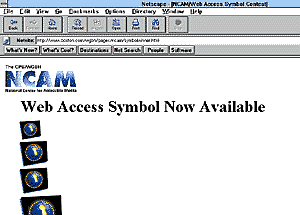 |
Web Access symbol (for people with disabilities) |
An email-based discussion list called Webwatch has been set up in the USA to exchange information about Web sites which are accessible and which may be of interest to people with disabilities. It also highlights important sites which are inaccessible. Often members of the list contact the Web site owners and raise accessibility issues.
The proliferation of Web authoring tools provides an avenue where accessibility features are built-in. For example, programs could prompt for the use of ALT tags when a link is made to a image file.
Web Browsers
The producers of Web browsers such as Netscape and Internet
Explorer have been encouraged to increase the utility of their
programs by incorporating more accessible features. While the
Americans with Disabilities Act ensures that some work has to be
done in this area, more is required.
Special browsing software called pwWebSpeak has been developed in the USA and is being tested in a beta version. This browser is entirely speech based so that a person with a vision impairment does not need any additional speech-reading software to access Web pages as long as the PC has a suitable sound card installed. The browser provides, in speech output, a thumbnail sketch of each Web page indicating such features as the number of lines of text and the number of links. It has a considerable number of users in the USA but has not yet been tested thoroughly in Australia.
Deakin University is developing a Web browser designed to have built-in accessibility features for people with vision impairment and physical disabilities. A prototype using a multimedia computer package is currently being tested and from this it is planned to develop a full-scale Web browser with screen magnification and voice activation by mid-1997.
Another forseeable concern is with browsers which have Java interpreters. Java is a programming environment which facilitates the expedient transfer of multimedia electronic documents across various platforms and enables programs to be executed on the user's own Internet browser. Java is an important extension to HTML but there are no accessibility standards considered for Java applications at this stage.
With a combination of raising public awareness of the need to develop accessible Web pages and of the work being undertaken to improve screen reading software, it is hoped that people with a disability will continue to enjoy the power of the Internet and its plethora of information and entertainment. But because Internet technology is changing rapidly and moving into areas like virtual reality, it is vital that this work is supported so that accessibility for people with a disability is continually maintained and improved.
Bibliography
Paciello, M. & H. Frystyk Nielsen (1996) W3C Disabilities
Developments. [http://www.w3.org/Disabilities/
Perrochon, L. & A. Kennel (1996) WAB: World Wide Web Access
for Blind and Visually Impaired Computer Users. [http://www.inf.ethz.ch/department/IS/ea/blinds/]
Pirtle, J. (1996) 'Second sight: Does the Web serve the visually
impaired?', in Yahoo! Internet Life, Nov. 1996 [http://www.zdnet.com/yil/content/mag/9611/blind9611.html]
The Productivity Works (1996) [Information about pwWebSpeak] [http://www.prodworks.com/]
Treviranus, J. & C. Serflek (1996) Alternative Access to the
World Wide Web [http://www.utoronto.ca/atrc/rd/library/papers/WWW.html]
Vanderheiden, G. (1996) HTML Quick Reference Page [http://www.trace.wisc.edu/TEXT/guidelns/htmlgide]